.svg)

Heeler Cloud Security: CSPM Traced From Prompt to Production
Today we're launching Heeler Cloud Security: cloud security posture management (CSPM) built on a live model of how your software is written, shipped and run.
That model changes what a cloud finding is. An open port is no longer a line in a report. It is a confirmed exposure on a resource, in front of a service, running an image built from a commit, merged in a pull request, written in an AI coding agent session, and owned by a team. Heeler shows all of it, on every finding, and keeps it current as your cloud changes.
What it changes for your security team
Finding misconfigurations is the easy part now. Latio's 2025 Cloud Security Report calls cloud posture "widely agreed to be commoditized." The hard part is everything after: knowing which findings matter, getting each one to the team that can fix it, and keeping up with code that ships daily and is increasingly written by AI agents.
That is where Heeler Cloud Security is built to help:
- Less noise. Urgent is reserved for what is live, reachable and important, with exposure confirmed by a live connection test.
- An owner for every finding. The service model knows which team owns each service and account. No tagging project first.
- Fixes, not tickets. Findings arrive as pull requests and base image upgrades, and new risk is stopped at the pull request.
- Accountability for AI-written code. Trace a cloud finding back to the coding agent session that wrote it.
- Your cloud as it is now. Changes reach Heeler in under a minute on AWS, not at the next scan.
- One platform for AppSec and cloud. Code, dependency, secrets, IaC, image and cloud findings, ranked and routed the same way.
The rest of this post shows how.
The context behind every cloud finding
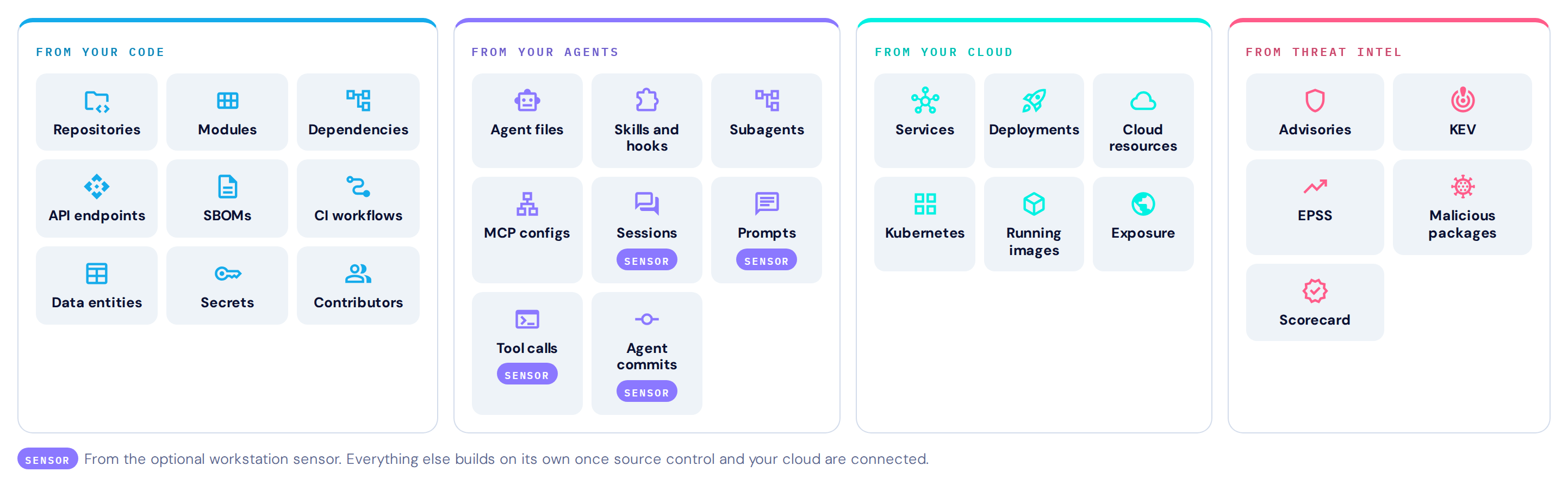
Good prioritization is only as good as the context behind it. Most posture tools see the cloud. Heeler sees the code, the agents that write it, the cloud it runs in and the threats against it, and joins them in one catalog it builds itself.
- From your code: repositories, modules, dependencies, API endpoints, SBOMs, CI workflows, data entities, secrets and contributors.
- From your agents: agent files, skills and hooks, subagents and MCP configs from your repositories, plus sessions, prompts, tool calls and agent commits from the Heeler Workstation Sensor.
- From your cloud: services, deployments, cloud resources, Kubernetes, running images and exposure.
- From threat intel: advisories, CISA KEV, EPSS, malicious packages and OpenSSF Scorecard.
Nobody has to tag anything or maintain a catalog by hand. Connect source control and your cloud, and the catalog builds and maintains itself. The sensor is optional and adds what agents actually do on developer machines.
That context is the difference between a finding and a decision. Heeler uses it to be deterministic where security needs the same answer every time, and puts AI to work where it helps. Read more about the Context Engine.
From the prompt to production
Every cloud finding in Heeler sits on a model of how your software is written, built and run. That model is what lets a finding reach the right team with the right priority, so it comes first.
The service model
The service is the atomic unit of Heeler. It is where business importance lives: tier, environment, application and owning team are set once on the service, and every finding on its code, images and cloud resources inherits them.
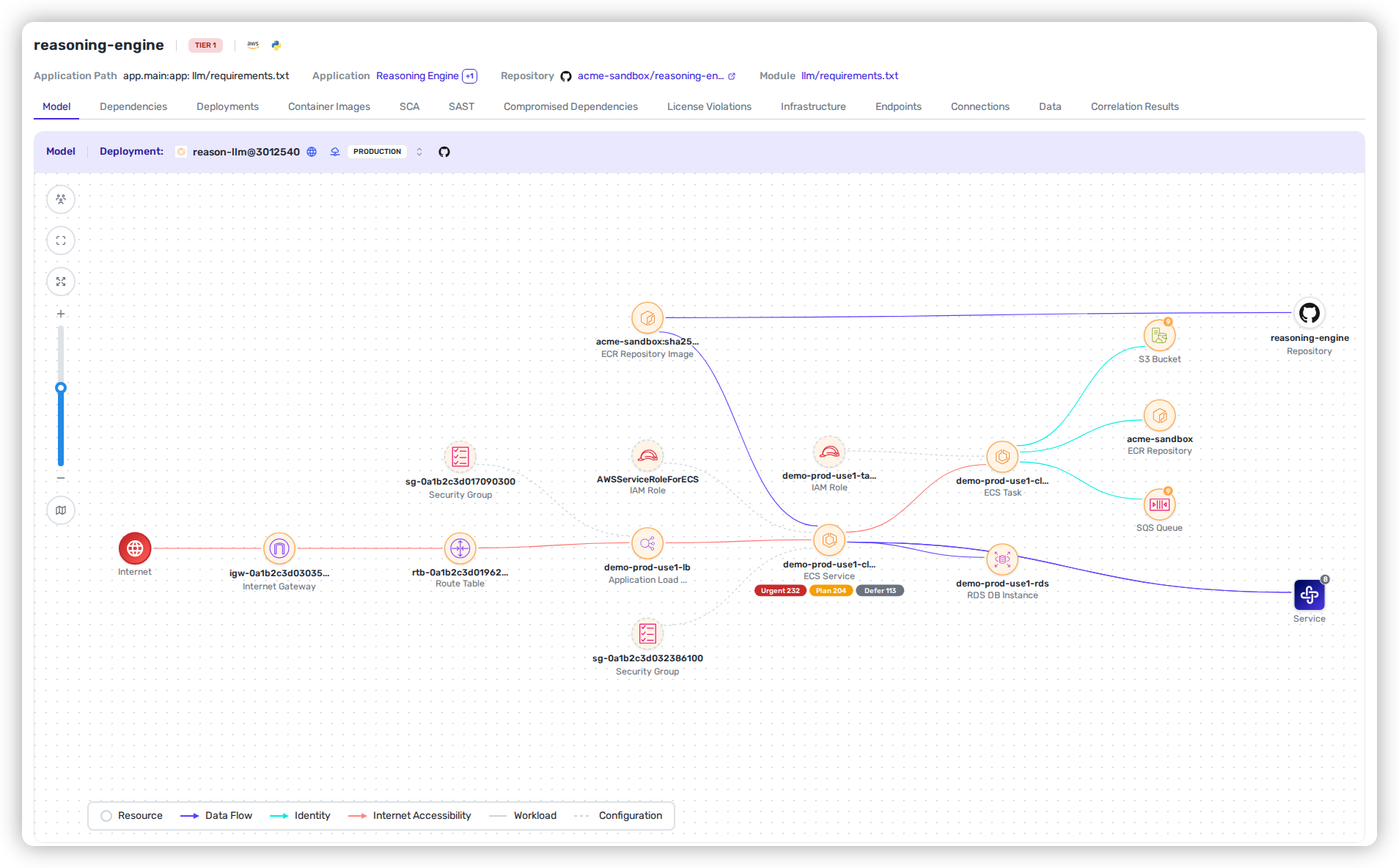
The Context Engine builds a live model of every service, and it is not a resource diagram. It is an architecture model: the service, the compute and storage it runs on, the services it talks to and in which direction, the data it reaches, the identities it runs as, and how the internet gets to it.
Heeler builds that model per deployment, for the exact changeset running in each environment, and keeps it current as code ships and the cloud changes. It needs no input from you: no tags, no catalog to maintain, no manifests to annotate. Monorepos are handled too, with each project modeled as its own service.
From agent session to cloud deployment
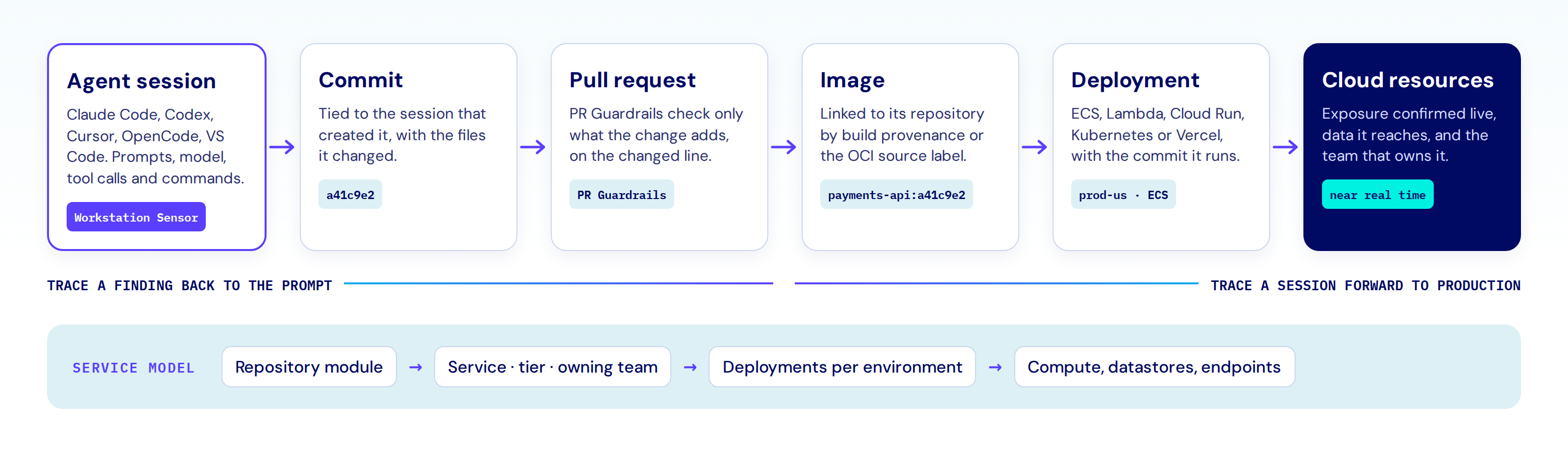
A growing share of the code in your cloud was written by an AI coding agent. Heeler records where it came from. The Heeler Workstation Sensor records coding agent sessions on developer machines across Claude Code, Codex, Cursor, OpenCode and VS Code: the prompts, the model, the tool calls and the commands the agent ran. When an agent creates a commit, Heeler ties that commit to the session that produced it.
From there, every link is one Heeler already models: the pull request and what PR Guardrails found in it, the image built from it, and the deployment and cloud resources it runs on.
Put together, that is lineage from a prompt to production, and accountability for code no human typed. A misconfigured resource or a vulnerable package in a running service traces back through the deployment, the commit and the pull request to the agent session that wrote it. A risky agent session traces forward to everywhere its code now runs.
Connect once, inventory everything
You cannot secure what you cannot see, and a stale inventory is its own blind spot. Heeler connects read-only at the organization level and finds every account, project, subscription and cluster beneath it.
Five clouds, organization-wide
- AWS: one CloudFormation StackSet for an AWS Organization, or one template for a single account.
- Google Cloud: Workload Identity Federation for the organization, so Heeler stores no service account keys.
- Azure: an Entra app registration for the tenant or management group, with workload identity federation or a client secret.
- Oracle Cloud: a tenancy connection through workload identity federation or an API signing key.
- Kubernetes: EKS, GKE and AKS clusters are discovered from their cloud connections. Any other cluster connects with a kubeconfig. On EKS, Heeler can use a read-only ClusterRole that never reads Secrets.
Expansive resource coverage, kept current in near real-time
The inventory covers hundreds of resource types across AWS, Google Cloud, Azure, Oracle Cloud and Kubernetes, and it moves when your cloud moves.
Heeler reads change events as they happen: AWS CloudTrail, Google Cloud Audit Logs through Pub/Sub, and the Azure Activity Log. Each change triggers a targeted re-collection of the exact resource it touched. A new ingress rule, a bucket policy edit or a role change shows up in Heeler within minutes, and in under a minute on AWS when CloudTrail is delivered through CloudWatch Logs.
That is what makes the rest of the picture trustworthy. Exposure, ownership and priority are recalculated on the cloud you have now, not the one you had at the last scan. Where event collection is not turned on, Heeler falls back to scheduled collection for each resource type.
Posture and compliance: hundreds of checks, mapped to your frameworks
Auditors want evidence, and owners want a short list of what to fix. Heeler gives both. It evaluates every resource against hundreds of checks across AWS, Google Cloud and Oracle Cloud. Each check carries its rationale and remediation guidance, and many include the exact CLI commands to fix the resource.
Built-in frameworks
- AWS Foundational Security Best Practices 1.0.0
- CIS AWS Foundations Benchmark 3.0.0, 4.0.0, 5.0.0, 6.0.0 and 7.0.0
- CIS Google Cloud Platform Foundation Benchmark 4.0.0
- CIS Oracle Cloud Infrastructure Foundations Benchmark 3.1.1
For Azure, Heeler brings in Microsoft Defender for Cloud assessments alongside the Azure inventory.
Your own frameworks, versioned
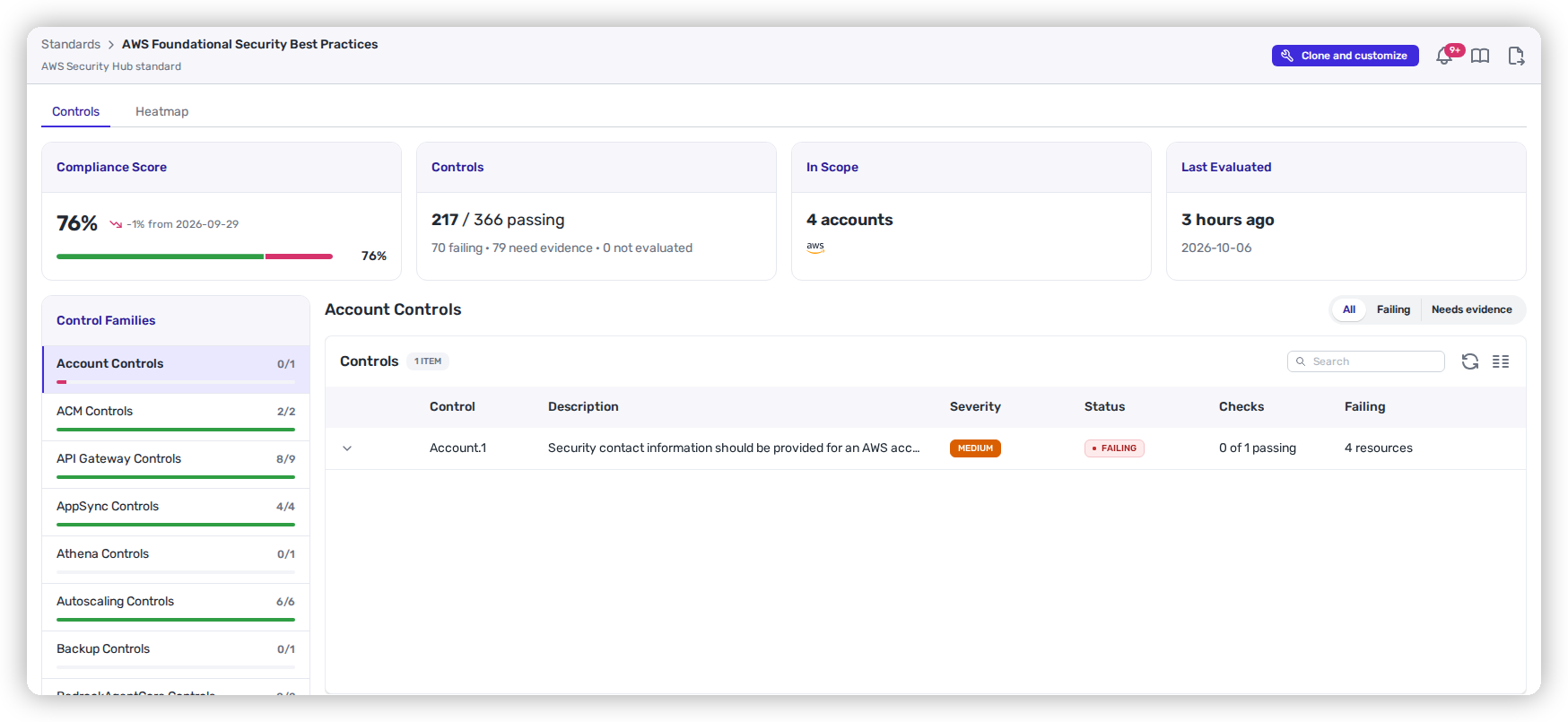
Internal standards rarely match a CIS benchmark line for line. Build your own from scratch or from a built-in one, publish numbered versions, and crosswalk controls to other frameworks. Every adopted framework is scored per account, with a heatmap of where failing controls cluster.
Exemptions with a second pair of eyes
Some failures are accepted on purpose. An exemption names the check and the resources, a reason (Remediation planned, Accepted risk, Compensating control or False positive) and optionally a ticket. It needs approval from someone other than the person who asked for it, and it carries an end date or comes up for review after a year.
Exposure: what the internet and outside accounts can actually reach
In an incident, and in every prioritization call, the question is the same: what can an attacker actually reach?
Internet accessible, confirmed by a live test
Heeler follows the network path to each resource: public subnets, route tables, security groups and CDN fronting. For 25+ resource and workload types across AWS, Google Cloud, Azure and Kubernetes, it then runs a live connection test. A resource marked Internet Accessible answered from the internet. It is not just configured to.
Who outside your organization has access
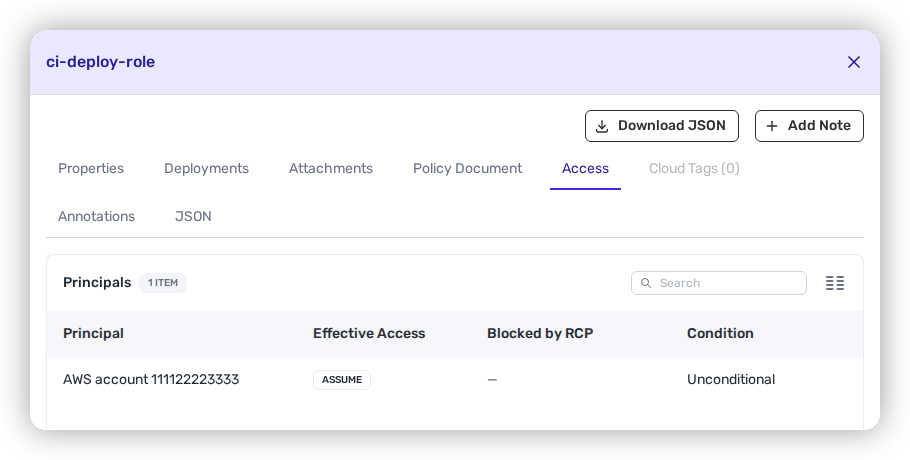
Heeler reads resource policies on a dozen AWS resource types, including S3, KMS, Lambda, SQS, SNS, Secrets Manager, ECR and IAM role trust policies, and applies your service control policies and resource control policies. It flags public access, cross-account access, access by known vendor accounts and access by accounts no one can name.
Identity risk
- IAM principals that can escalate to administrator, detected from 25+ known privilege escalation action combinations.
- Roles, users and credentials unused for 90 days.
- Secrets in AWS Secrets Manager that nothing reads.
Cloud Events: who changed what, and which changes need a look
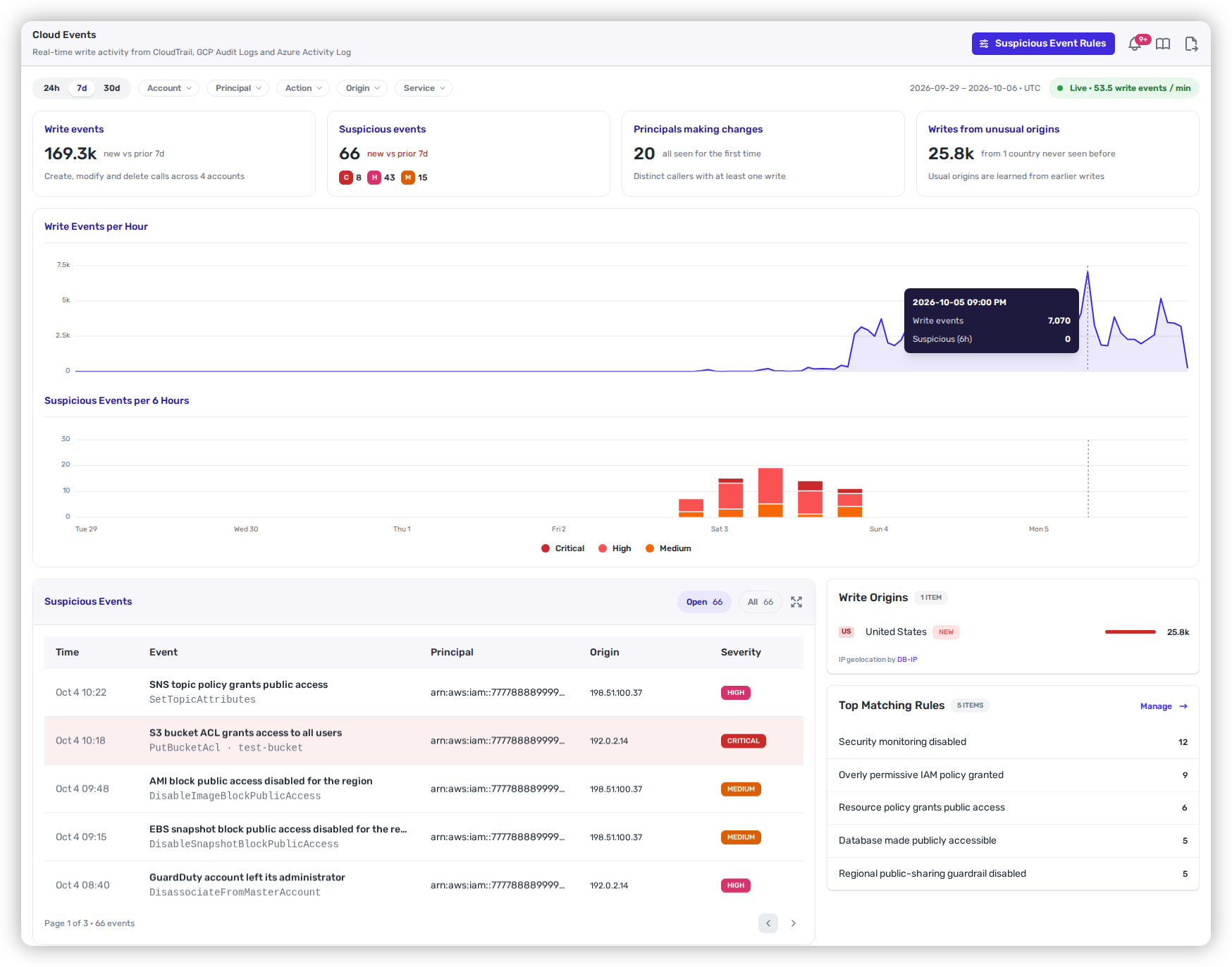
When something changes in your cloud, the first questions are who did it, from where, and what else they touched. Heeler reads every write in CloudTrail, Google Cloud Audit Logs and the Azure Activity Log. Dozens of Heeler-managed rules flag the changes that need a look, such as audit logging turned off, root account activity, a snapshot shared outside the organization or MFA removed.
Your own rules, tested before they go live
Custom rules match on more than a dozen fields, including action, principal, MFA, console sign-in, source IP, user agent, request parameters, time of day and the country a call came from. A rule can match on a value Heeler has never seen before, such as a first call from a new country. Every rule is backtested against the last 7 days before you turn it on, so you see exactly what it would have flagged.
Context for every suspicious event
Each suspicious event shows who made the change, from which country, whether that country is new for the account, and what else that principal did in the 10 minutes on either side. Suspicious events can start a workflow in Slack, Microsoft Teams, Google Chat, email, a webhook, Jira, Linear, Shortcut or a GitHub issue.
Which vulnerabilities are running, and where
Every code, dependency, IaC and image finding shows whether it ships in a running service, whether that service is internet accessible, and whether it reaches secrets or datastores. Autotriage combines those facts with tier and environment to place it in Urgent, Plan or Defer.
Datastores can be classified Public, Internal, Confidential or Restricted across 25+ datastore types, and a path to restricted data raises the stakes of everything on it.
Ownership built in
A commit author is not an owner. Teams own cloud accounts directly, or through an AWS OU, a Google Cloud folder or an Oracle Cloud compartment, and services carry their owning team in the service model. Every finding goes to that team, and team members see the accounts their teams own.
A worked example: from an open port to the owning team
Here is how the pieces fit on one finding.
- The check fails. Security group
sg-ordersallows port 5432 from0.0.0.0/0. That fails AWS FSBP EC2.19. - The exposure is confirmed. Heeler follows the path from the internet gateway through the public subnet to
orders-db, then runs the live test. Port 5432 answers. The database is Internet Accessible, not just misconfigured. - The code is attached.
orders-dbis classified Restricted. Thepayments-apiservice reaches it, and its running image includes a vulnerablelog4j-core. That finding moves to Urgent. - The definition is found. The security group is defined in
modules/db/security.tfin the infrastructure repository, and Heeler matches the IaC finding to the live resource. If an AI coding agent wrote that change, the commit leads back to its session. - The owner gets the fix. The account belongs to Team Payments. The ticket names the file and line, the recommended change in code, and the CLI steps to fix the live resource now.
The recommended change in code:
cidr_blocks = ["0.0.0.0/0"] → cidr_blocks = ["10.0.0.0/16"]
And the immediate fix on the live resource, from the check's guidance:
aws ec2 revoke-security-group-ingress --group-id sg-orders --protocol tcp --port 5432 --cidr 0.0.0.0/0
Infrastructure as code: fix what is live first
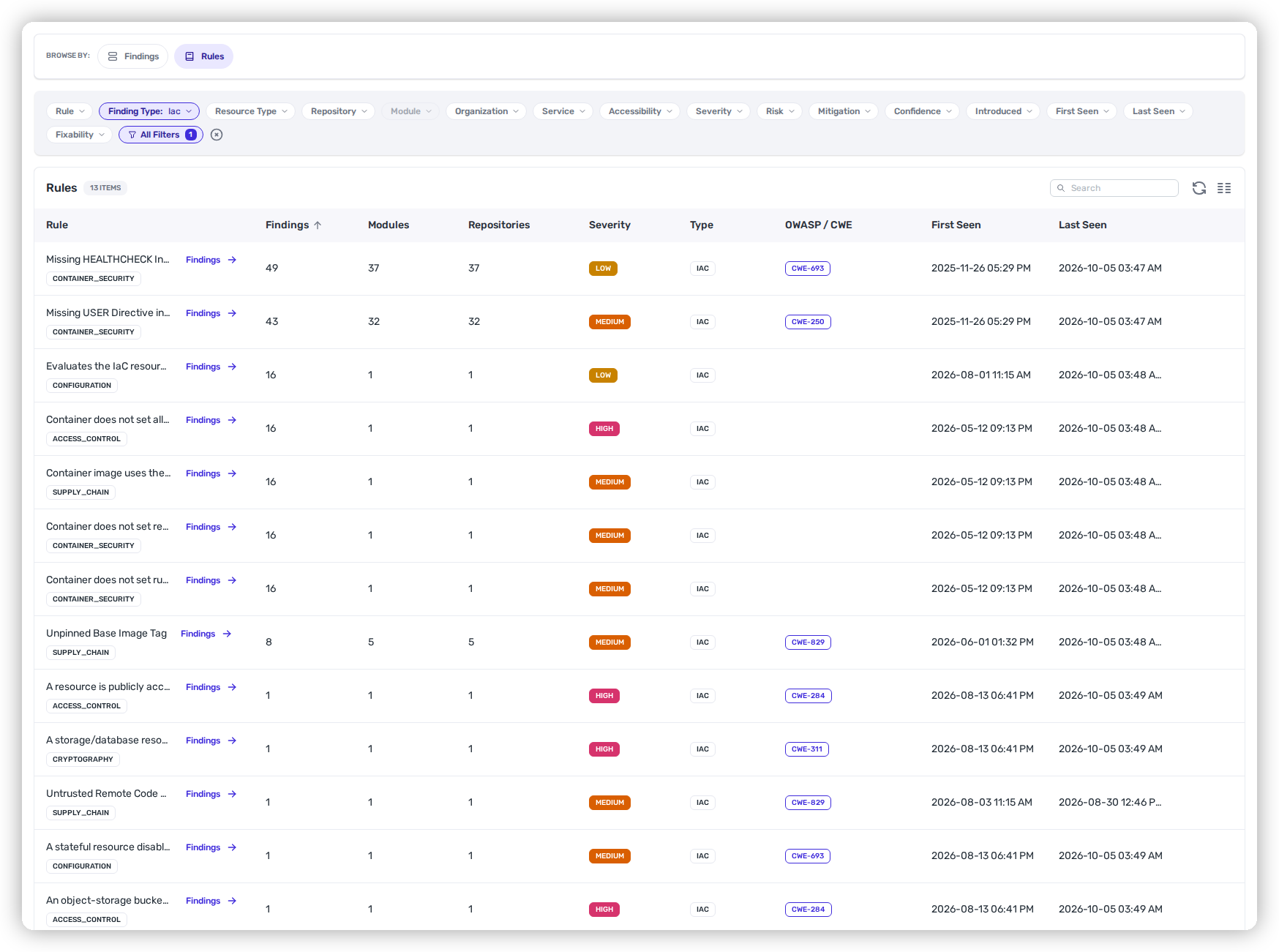
A fix made only in the console drifts back the next time someone applies the code. Fixing the definition makes it stick. Heeler scans Terraform, OpenTofu, CloudFormation, Pulumi and Kubernetes manifests. What makes it different is the match to the cloud.
Matched to the resource it built
Each IaC finding is matched to the live resource it defines, such as an S3 bucket, RDS database, EC2 instance, load balancer, EKS cluster or Kubernetes Service. Heeler links a finding only when exactly one live resource matches. It never guesses.
Ranked on what is real
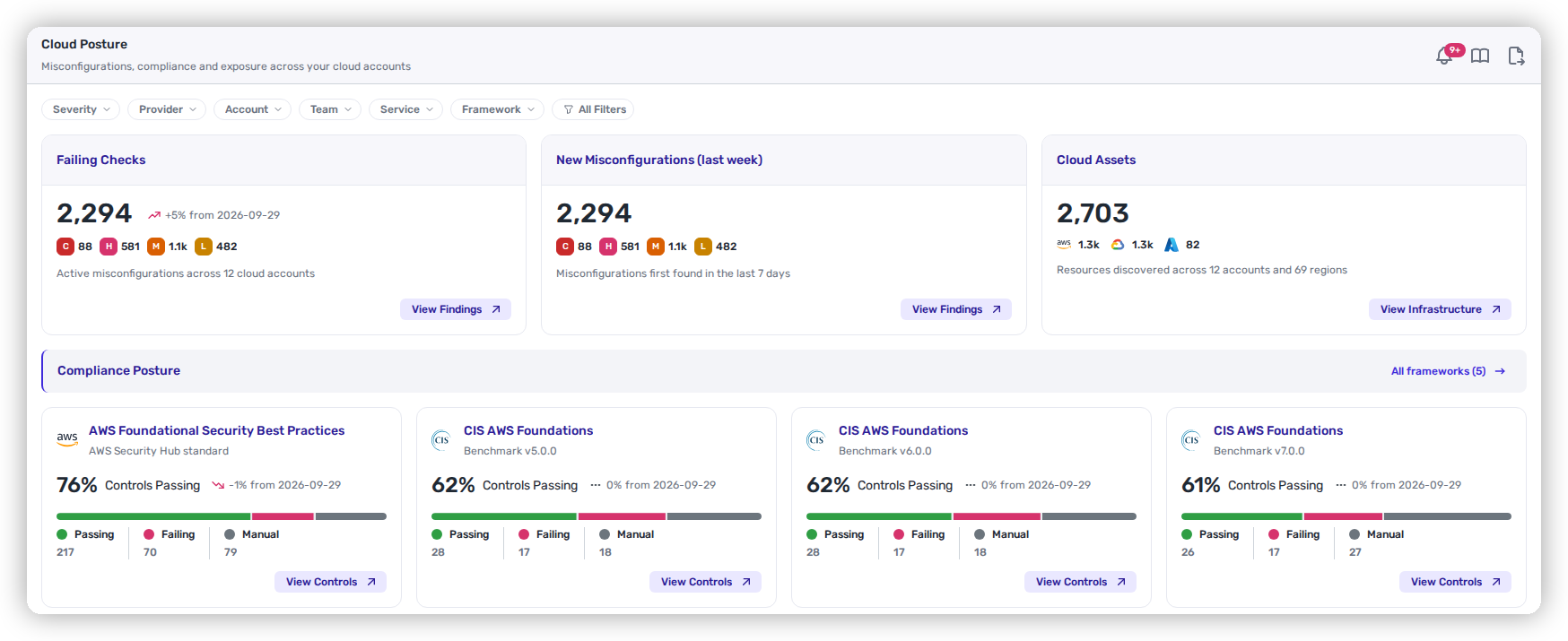
A finding whose live resource is confirmed internet accessible can be Urgent. A finding where the exposure exists only in the code is capped at Plan. A resource Heeler observed as not exposed outranks what the code declares. With the default SLOs, that is 14 days for Urgent, 60 for Plan and 120 for Defer.
Stopped on the pull request
PR Guardrails flag only the misconfigurations a pull request adds, not the ones already on the base branch. Each guardrail can block, warn or notify, and shows a recommended fix on the changed line. We covered the pattern in Terraform security scanning in the PR. Learn more on the IaC security page.
Container images: the vulnerabilities that run
Most image vulnerabilities come from the base, and one base upgrade can clear them across every image built on it. Heeler scans images in Amazon ECR, Google Artifact Registry and Container Registry, and Azure Container Registry. Images are scanned when they are pushed, and rescanned every day while they run. Heeler finds the running ones in ECS, Kubernetes, Cloud Run and Lambda.
Inside every image
- OS and language packages, with vendor OpenVEX statements honored.
- Secrets in any layer, with the layer that added them.
- End-of-life grading on 15+ OS families and the major language runtimes, including Node.js, Python, Java, .NET and Go.
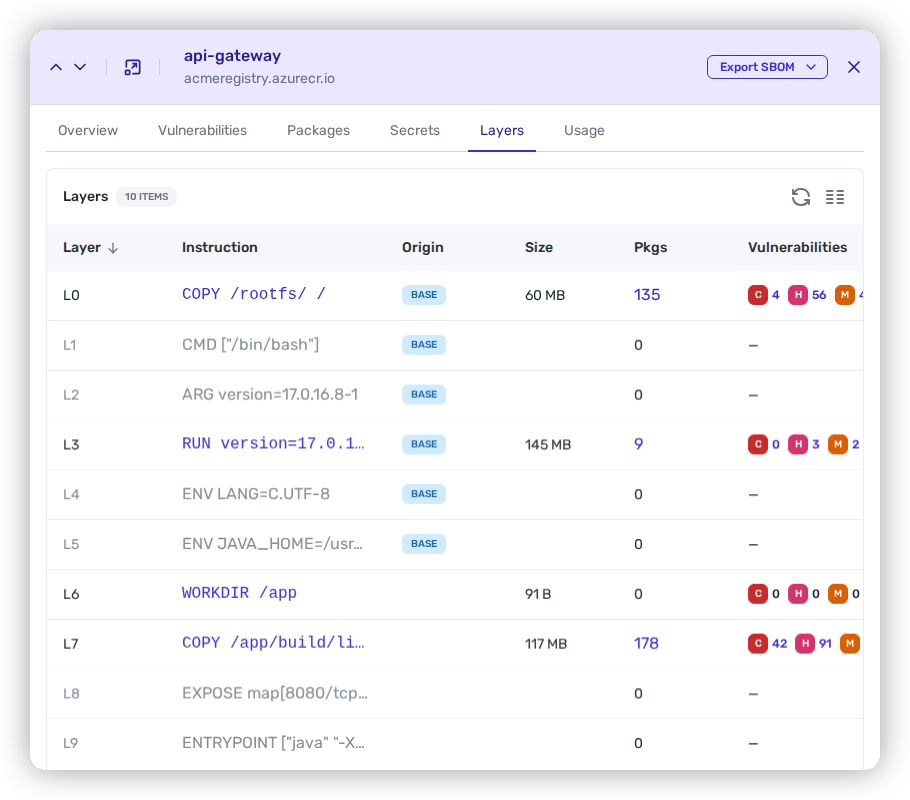
- Each package and finding attributed to base layers or your layers, down to the Dockerfile instruction that added it.
- SBOM export in CycloneDX and SPDX 2.3.
Fixed at the source
Base image vulnerabilities get a base upgrade recommendation, ranked by the most CVEs removed, and Heeler can open the pull request. Vulnerabilities in your own layers go to the owning team, ranked Urgent, Plan or Defer by where the image runs. More on the container security page.
Cloud posture from your coding agent
The same context is available to the agents your developers already use. The Heeler MCP server includes cloud_posture_summary, which returns posture by framework and account, exposure, exemptions and failing checks to any MCP client, and cloud exemption tools let an agent list and manage exemptions.
Get started
Heeler Cloud Security is available now. Existing customers connect a cloud organization from the Connections page; the Cloud Security docs walk through each provider. To go deeper:
See the full capability on the Cloud Security page.
FAQ
What is Heeler Cloud Security?
Heeler Cloud Security is CSPM that traces every cloud risk through the deployment, commit and pull request to the AI coding agent session that wrote the code, and routes it to the team that owns it. It covers posture checks, framework scoring, confirmed exposure, cloud change events, IaC and container images.
Which clouds and frameworks does it support?
It inventories AWS, Azure, Google Cloud, Oracle Cloud and Kubernetes. Its checks cover AWS, Google Cloud and Oracle Cloud, mapped to AWS FSBP and CIS benchmarks for each, and Azure posture comes from Microsoft Defender for Cloud assessments. You can also build your own versioned frameworks.
How is this different from a standalone CSPM?
A standalone CSPM tells you what is misconfigured. Heeler shows where the code behind it came from, down to the agent session, ranks it on what is live, and puts it in front of the team that owns it.
Do I need to install agents or tag resources?
No. Heeler connects through read-only cloud and source control connections and builds the inventory and the service model itself, with no tags, no workload agents and no catalog to maintain. The Workstation Sensor is optional and only adds AI coding agent lineage.
What does the Workstation Sensor record?
It records coding agent sessions on developer machines across Claude Code, Codex, Cursor, OpenCode and VS Code: prompts, responses, the model, tool calls, commands and the commits an agent creates. Credentials are stripped from repository remotes and MCP configuration, and raw transcripts expire while the indexed session record stays.
How does Heeler decide who owns a finding?
From the service model and your cloud structure. Teams own accounts directly or through an AWS OU, Google Cloud folder or Oracle Cloud compartment, and every service carries its owning team, so a finding goes to the team responsible for the service, not to whoever last committed.
Does it support monorepos?
Yes. Heeler breaks a monorepo into its projects and models each one as its own service, with its own deployments, findings and owner.
Does Heeler need write access to my cloud?
No. Heeler connects read-only and is denied data-plane reads such as S3 objects and database rows. On AWS, one optional permission lets it run its read-only analyzer on EC2 instances; leave it out if you run no EC2 workloads.
How fast does it see a change?
Within minutes. Heeler reads CloudTrail, Google Cloud Audit Logs and the Azure Activity Log as changes happen and re-collects the resource each change touched, in under a minute on AWS with CloudWatch Logs delivery. Without event collection, Heeler falls back to scheduled collection.
Does it work with the tools my teams already use?
Yes. Findings and suspicious events can open tickets in Jira, Linear, Shortcut or GitHub, post to Slack, Microsoft Teams or Google Chat, and send email or webhooks. Coding agents can query cloud posture through the Heeler MCP server.
Cloud risk is only fixed when someone owns it. Heeler Cloud Security puts every cloud finding next to the code that built it, the session that wrote it and the team that can fix it. See it on your own accounts: Get a demo.

Related resources
.jpg)